
Create tokens for CI and teammates
The token the installer printed is the root token, and it can do everything. Nobody else needs that much. This page shows the three roles a token can have, how to create a token for CI or a teammate, how to limit it to some applications and give it an end, how to change either later, how to use it from a pipeline, a laptop and the dashboard, what a token is told when it asks for too much, and how to see which tokens are in use and revoke one.
The short version, for a pipeline that deploys two applications:
shipwick token create ci --role deploy --app my-api --app web --expires 90dPeople who use the dashboard need no token at all when the agent has a sign-in provider: see Sign in with your company's accounts.
Before you begin
- Managing tokens needs the
adminrole: the root token, or a token created with--role admin. - The agent must be 0.3.0 or later. An older agent has one token and no roles;
shipwick tokenagainst it answersThe agent does not know this operation — it is probably older than this shipwick. --appand--expiresexist since 0.6. An older agent creates nothing and the command says so:the agent is older than this shipwick: it knows neither --app nor --expires, and created nothing.shipwick token updateexists since 0.7. An older agent changes nothing, and the command says that the agent is older; until it is upgraded, create a new token and revoke the old one.
The three roles
Every endpoint of the API requires a role, and a role includes the ones below it:
| Role | May |
|---|---|
read | See everything: applications, deployments and their history, logs, events, metrics, traffic, jobs and runs, volumes, the backups the server took, the names of the secrets, the registries that have a credential and the supplied certificates without their passwords and keys, the server, what a standby holds, and the Prometheus endpoint /metrics |
deploy | And change what runs: deploy, redeploy, roll back, stop, start, run a job or a command, send an image or a static folder, take a backup on the server and verify one, and get an application's deploy.yaml back with shipwick config |
admin | And everything else: delete applications, download and restore volume backups, remove a backup, remove the volume of a deleted application, store and remove secrets, registry credentials and certificates, rotate the encryption key, back up the agent's own state, export the server, import an export, adopt backups, pull and promote on a standby, create, list, change and revoke tokens, read and export the audit trail, manage who may sign in |
Give CI a deploy token: a pipeline deploys and rolls back, and never needs to delete an application. Give people admin tokens, someone who only watches a read one, and a Prometheus scraper a read one of its own.
admin is root on the server
The agent drives Docker, and whoever can submit a deploy.yaml can run any image on the server. A deploy token is already that; an admin token can also delete applications and mint more tokens. Roles limit what a token may ask of the agent, not what the server can be made to do. See Security.
The root token
The token the agent is configured with, SHIPWICK_AGENT_TOKEN in /opt/shipwick/.env or the one the agent generated on its first start, is the root token. It has the admin role and the name root, is not stored in the database, does not appear in shipwick token ls, does not expire, and cannot be revoked or changed through the API: to change it, set a new SHIPWICK_AGENT_TOKEN on the agent and restart it. Keep it for yourself, and create the others from it.
Create a token
shipwick token create ci --role deploy✓ Created token ci with the deploy role
swk_Xk3nM9…
Store it now: it will not be shown again.
In CI, set SHIPWICK_AGENT_TOKEN to it. On a machine you work from, save it with: shipwick loginThe value is shown once. The agent keeps only its SHA-256 hash, so it cannot be shown again; a lost token is revoked and replaced. The swk_ prefix is not part of the secret: it exists so that a token is recognisable where it must not be, in a log or a repository.
| Name | Lowercase letters, digits and dashes, at most 40 characters; root is taken. A name that exists is refused: a token with this name already exists. |
--role | read, deploy or admin. Required: choose what the token may do: --role read, deploy or admin. |
--app <name> | Limit a deploy token to this application; repeat for several. See below. |
--expires | When the token stops working: days or hours from now (90d, 12h) or a date (2027-01-31). See below. |
Name tokens after what uses them, ci, github-actions, alice, so that token ls and the history read well.
Limit a token to some applications
Since 0.6 a deploy token can be limited to the applications you name:
shipwick token create ci --role deploy --app my-api --app web✓ Created token ci with the deploy role, limited to my-api, web
swk_Xk3nM9…
Store it now: it will not be shown again.
In CI, set SHIPWICK_AGENT_TOKEN to it. On a machine you work from, save it with: shipwick loginWhat such a token may do:
- To
my-apiandweb, everything thedeployrole allows: deploy, redeploy, roll back, stop, start, run commands and jobs, take and verify backups. The first deployment is included: the application need not exist yet, so a token can be created for an application before anyone has deployed it. - Read everything, as every token does: the other applications, their logs and history, the server.
- Change nothing else. Another application is refused with a message that names the token's applications, and so is anything of the
deployrole that is not about one application. What takesadminstays refused, also for its own applications.
Only deploy can be limited: a read token changes nothing, and admin is for the whole server. Since 0.7 the list can be changed later.
A limit is not a wall between tenants
A limit narrows what a token can be used for by mistake or after a leak: a CI token taken from one repository cannot redeploy another's application. It does not hide anything. A limited token still reads every application's logs and configuration, though never the values of env.
Give a token an end
--expires, since 0.6, takes days or hours from now, or a date:
shipwick token create ci --role deploy --expires 90d
shipwick token create contractor --role read --expires 2027-01-31 # works through that day, UTC✓ Created token ci with the deploy role
It expires on 2027-01-01 at 14:30, in 90 days.From then on the token is refused, and whoever presents it is told that it expired and when; a wrong token is told nothing of the kind. An expired token stays in shipwick token ls until you revoke it. The root token does not expire.
shipwick token ls marks what expires within 14 days, and shipwick doctor and shipwick server status say when the token they run with does, so a pipeline's token does not run out unannounced.
Change a token
Since 0.7 the applications and the end of a token can be changed while it is in use. Its value stays the same, so nothing that holds it needs touching:
shipwick token update ci --app my-api --app web --app worker   # replaces the list
shipwick token update ci --all-apps                            # lifts the limit
shipwick token update ci --expires 90d                         # moves the end
shipwick token update ci --no-expiry✓ Changed token ci
It is limited to my-api, web, worker.After --all-apps --no-expiry the answer reads:
✓ Changed token ci
  It is not limited: it may change every application.
It does not expire.--appreplaces the list, it does not add to it, and is checked as at creation: valid names, at most 50, adeploytoken.- The change holds from the token's next request.
- The role cannot be changed. A token that is to do more than it was created for is a new token, so that a
readtoken handed to a contractor never becomesadminby an edit. - The root token cannot be changed here at all:
the root token is the one the agent is configured with: it is not limited and does not expire; change SHIPWICK_AGENT_TOKEN on the agent instead. - Every change is in the audit trail with what was there before, under the name of whoever made it:
WHEN                  WHO    ACTION         ON    RESULT   FROM           DETAIL
2026-10-04 03:23:06   root   token.update   ci    ok       203.0.113.40   applications my-api web -> all, expires 2026-11-03T00:23:04Z -> never
Move an end, or replace the token
--expires also moves the end of a token that has expired already, which then works again. An end is moved into the future only: to stop a token now, revoke it.
An end bounds how long a token that leaked unnoticed stays useful, and moving it gives that up for the time added: the value that may have leaked is still the one in use. Where that matters — a token that left with a person, or sat in a log — create its replacement, hand it over and revoke the old one instead. Where a pipeline simply reached its date, moving the end is the honest alternative to creating tokens without one, and the trail keeps the old date next to the new and the name of who moved it.
Use a token from CI
A pipeline needs no shipwick login. Put the agent's URL and the token in the CI system's secret store and expose them as environment variables:
env:
  SHIPWICK_AGENT_URL: ${{ secrets.SHIPWICK_AGENT_URL }}
  SHIPWICK_AGENT_TOKEN: ${{ secrets.SHIPWICK_AGENT_TOKEN }}
shipwick never accepts the token as a flag. The whole pipeline is in Deploy from CI.
Use a token from a laptop
shipwick login --url https://agent.example.comAPI token:
✓ Logged in to https://agent.example.com (vps-1, agent v0.4.1)
saved as context default in /home/me/.config/shipwick/config.yamlThe token is asked for without echo, verified against the agent, and saved in a file only you can read. shipwick server status then says which token you are:
Token ci (deploy, limited to my-api, web, expires in 89 days)The same is token in GET /server: name, role, kind, the applications it is limited to and expires_at, so a script knows what its token may do before it tries. See the API reference.
When the role is too small
This section covers every refusal: a role that is too small, a limit, an expiry, and a wrong token. A token asked to do more than its role allows is told which role it has and which one it needs. From shipwick:
This token may not do that: it has the read role.

Use a token with the deploy role, or create one with: shipwick token create <name> --role deploy
From the API, 403 FORBIDDEN:
{ "error": { "code": "FORBIDDEN",
             "message": "this token has the read role; deploying needs deploy or admin",
             "details": { "role": "read", "required": "deploy" } } }
A limited token that asks to change another application is 403 TOKEN_LIMITED:
This token may not do that: it is limited to my-api, web.

It can read worker, not change it. Use a token that covers it, or create one with: shipwick token create <name> --role deploy --app worker
An expired token is 401 TOKEN_EXPIRED, which only the token itself is ever answered:
The token ci expired on 2026-10-02 at 12:00.

An admin lets it work again with: shipwick token update ci --expires 90d
Or creates a new one with: shipwick token create
Then set SHIPWICK_AGENT_TOKEN to it, or save it with: shipwick login
A wrong or revoked token is 401 UNAUTHORIZED instead, The agent rejected the API token. from shipwick. Guessing is slowed down: after 20 failed authentications within a minute from one address, the agent answers wrong tokens from it with 429 RATE_LIMITED for the next minute (Too many failed attempts from this address; try again in a minute. from shipwick). A valid token is never refused, so nobody with the right token is locked out, and only failures count. An expired token does not count either: a pipeline that keeps trying with last quarter's token locks nobody out.
In the dashboard
Anyone can sign in to the dashboard with a token, and the dashboard becomes that token. The sidebar shows its name and role, and from fourteen days before, when it expires. For a deploy token limited to some applications, the page of every other application says in words that it can be looked at and not changed. Controls the role does not cover are disabled with the reason: a read token cannot deploy, redeploy, roll back, stop, start, or take or verify a backup; only admin can delete an application, download, restore or remove a backup, store or remove a secret, a registry credential or a certificate, remove the volume of a deleted application, write an export, promote a standby, rotate the encryption key, or open Access, where tokens are created — with applications chosen for the deploy role, and an expiry of 30, 90 or 365 days or a date — listed and revoked, the new token's value shown once in the page. Since 0.7 Edit in a token's row changes its applications and its end. Whatever the page shows, the agent enforces the roles: a request the role does not cover is answered 403 however it was made. See Use the dashboard.
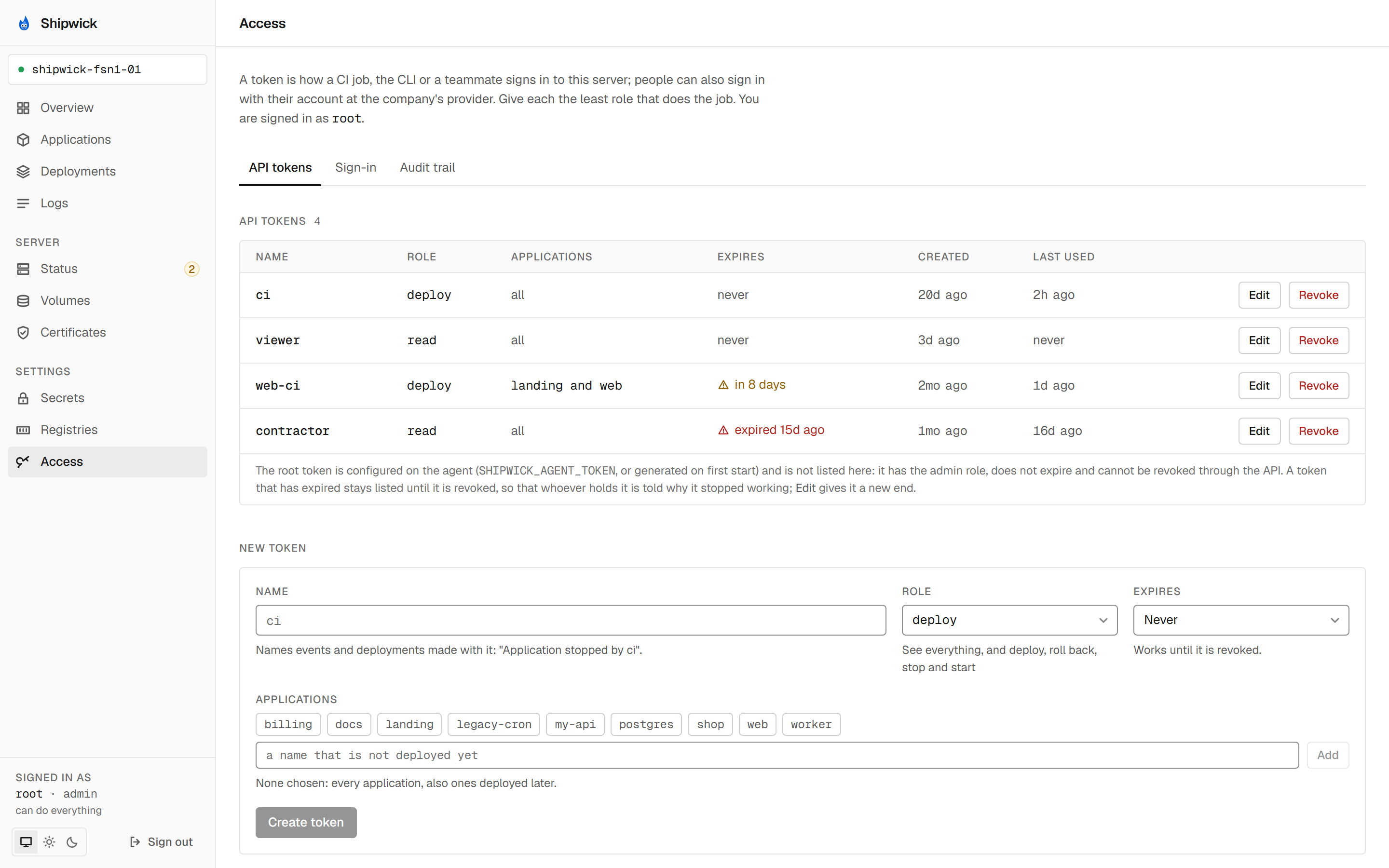
See which tokens are in use
shipwick token lsNAME ROLE APPLICATIONS EXPIRES CREATED LAST USED
ci deploy my-api, web in 8 days (soon) 2026-07-13 4m ago
alice admin all never 3d ago 2h ago
viewer read all never 1d ago never
contractor read all expired 15d ago 2026-08-18 16d ago
Expired, or expiring within 14 days: ci, contractor. Move an end with: shipwick token update <name> --expires 90dAPPLICATIONS is all for a token that is not limited. LAST USED says whether a token is still in use, not what it did last: it is recorded to the minute, and is never until the token's first request. The root token is not listed, because it is configured on the agent rather than stored. Without any token besides root, the command says so and shows the line to create one.
Revoke a token
shipwick token revoke ciThis revokes token ci: whatever uses it is refused from now on.
Type the token name to confirm: ci
✓ Revoked token ciRequests with the token are 401 from then on; a pipeline that still carries it fails at its next shipwick deploy. Outside a terminal, pass --yes. A token may revoke itself. shipwick token revoke root is refused with the root token is the one the agent is configured with; change SHIPWICK_AGENT_TOKEN on the agent instead, and an unknown name with there is no token named ci.
Who did what
- Deployments record the token that started them:
byon every deployment in the API,"root"for the agent's own token, shown in the dashboard's deployment history. Deployments made before the agent had named tokens carry noby. - Stops and starts by a token other than root name it in the application's event feed:
Application stopped by ci. An operation by the root token readsApplication stopped; on a server with one token, "by root" would say nothing. GET /servernames the caller, so a script can check which token it runs as before it acts.- Every request that changes something is in the audit trail, since 0.6: who, when, from which address, what it was about and how it was answered, refusals included.
shipwick auditreads it; see See who changed what.
What's next
- Deploy from CI with a
deploytoken. - Sign in with your company's accounts: people in the dashboard, without tokens.
- See who changed what: the audit trail.
shipwick tokenin the CLI reference, and Tokens in the API reference.- Security: the trust model behind the roles.