
See who changed what
Since 0.6 the agent writes down every request that changes something: who made it, when, from which address, what it was about and how it was answered. A request that was refused is recorded too, since an attempt is what one looks for after a token leaked. This page shows how to read the trail, how to filter it, how to take it out as a file, what an entry says, what is recorded and what is not, and how long it is kept.
Before you begin
- Reading the trail needs the
adminrole. See Create tokens for CI and teammates. - The agent is 0.6 or later. An older one answers
the agent is older than this shipwick and keeps no audit trail. The trail starts with the first change made after the upgrade; nothing from before is in it. - The filters by action, result and kind of actor, and the export, need an agent of 0.7 or later. An older one is told apart, and nothing unfiltered is shown as if it were filtered:
the agent is older than this shipwick: it filters the audit trail by application, actor and time only, and would have ignored --action, --outcome and --actor-kind.
Read the trail
shipwick auditWHEN WHO ACTION ON RESULT FROM DETAIL
2026-10-03 20:20:44 root secret.set DB_PASSWORD ok 203.0.113.9
2026-10-03 20:20:22 ci deploy web refused 203.0.113.40
2026-10-03 20:20:17 ci deploy my-api ok 203.0.113.40 deployment 2
2026-10-03 20:20:06 root token.create ci ok 203.0.113.9 role deploy, limited to my-api, expires 2027-01-01T17:20:06ZThe last 50 entries, newest first, with times in your machine's time zone. Here the token ci, limited to my-api, deployed it, and was refused when it tried web.
| Column | |
|---|---|
WHO | The token's name, root for the agent's own, or the name of a person who signed in: the e-mail address, or what the agent names people by. |
ACTION | What was asked for: deploy, rollback, stop, secret.set, token.create, backup.restore and so on. The full list is in the API reference. |
ON | The application, and what else the request named: the job, the volume, the backup's id, the secret, the registry, the hostname of a certificate, the token. server for what is about neither. |
RESULT | ok: the request was accepted. refused: the role or the application limit did not allow it. failed: <code>: anything else, with the error's code. |
FROM | The address the request came from. |
DETAIL | What was started — deployment 12, run 4, backup 7 — or what was asked for: a created token's role, applications and expiry. |
ok means the request was accepted. How a deployment then went is in its own record, which the detail names: shipwick status and the dashboard's history show it.
Filter it
shipwick audit --app my-api --since 7d
shipwick audit --actor ci -n 200
shipwick audit --action token. --action access. --outcome refused,failed
shipwick audit --actor-kind person --since 30d| Flag | |
|---|---|
--app <name> | Only what was done to this application. |
--actor <name> | Only what this token, or this person, did. |
--actor-kind | Only what tokens did, or only what people who signed in did: token or person. Since 0.7. |
--action | Only this action, as the ACTION column shows it, or the start of a family with its dot: token. is every action on tokens, backup. every one on backups. Repeat it, or give a list separated by commas, at most 20; an entry matches when one of them does. Since 0.7. |
--outcome | Only what ended this way: ok, refused or failed; several the same way. Since 0.7. |
--since | How far back: days or hours (7d, 24h) or a date (2026-09-01). |
-n, --tail | How many entries, newest first. 50 unless you say otherwise, at most 500. The long form is --tail since 0.10, as in logs and traffic; it was --lines. |
--before <id> | Continue with the entries older than the one with this id. |
Filters of different kinds narrow each other. What was done to tokens, for instance:
shipwick audit --action token. -n 5WHEN WHO ACTION ON RESULT FROM DETAIL
2026-10-04 03:23:06 root token.update ci ok 203.0.113.40 applications my-api web -> all, expires 2026-11-03T00:23:04Z -> never
2026-10-04 03:23:05 root token.create ci ok 203.0.113.40 role deploy, limited to my-api, expires 2026-11-03T00:23:04ZA page that is not the end of what matches closes with the command for the next one:
Older entries: shipwick audit --app my-api --before 4812Nothing found reads Nothing recorded that matches.
Take the trail out
Since 0.7, with --format or --output the command writes everything that matches instead of a page:
shipwick audit --since 2026-01-01 --output audit-2026.csv      # a file only its owner reads
shipwick audit --action deploy --format json | jq -r .actor.name✓ Wrote the audit trail to audit-2026.csv
The export is recorded in the trail, with who took it.| Format | |
|---|---|
csv | One row per entry under a header: id, at, actor_kind, actor, address, forwarded_for, action, application, target, outcome, status, code, detail. Times in UTC. |
json | One JSON object per line, the same object the API returns. |
Both are newest first. --output takes the format from the file's name (.csv, .json, .ndjson), does not write over a file that exists, and leaves none behind when the export was interrupted. -n and --before do not go with an export: it is everything that matches, narrowed by the filters above. The agent sends the trail as it reads it, 500 entries at a time, so the largest trail costs it no more memory than a small one.
A CSV file is usually opened in a spreadsheet, and a spreadsheet takes a cell that begins with =, +, - or @ for a formula. The trail holds names that callers chose — a request for a token called =HYPERLINK(…) is refused and recorded with that name — so every such cell is written with an apostrophe in front, which Excel, LibreOffice and Google Sheets show as text. The JSON export, and the trail itself, keep the values as they were recorded.
An export needs admin and is itself an entry, audit.export, with who took it, the format, the filters and the number of entries.
What is recorded
- Deployments, redeployments and rollbacks, stops and starts, deletions.
- Commands and jobs started by hand, uploaded images and folders.
- Secrets set and removed, by name and never by value; registry logins and logouts; certificates.
- Tokens created, changed and revoked, key rotation.
- Backups taken, verified, restored, removed, downloaded and adopted; volume downloads, restores and removals.
- Exports, imports and promotions.
- Sign-ins, the refused ones too, sign-outs, and every change to the access rules.
Not recorded:
- Reading. Listing applications or following logs leaves no entry. The three exceptions hand data out whole: downloading a volume's archive, a backup's, and the export of this trail.
- What the agent does by itself: scheduled backups, jobs and exports, restarts by the supervisor. Those are in the application's events.
- A request without a valid token. It has no name to record; it is in the agent's log, and counted by the limit on failed attempts.
Nothing from a request's body is kept except names: no env, no secret's value, no command, no passphrase.
Where a request came from
Behind the proxy the address is the one Caddy saw the request come from. For an agent hostname behind Cloudflare's proxy that is Cloudflare's address. On a direct connection, such as an SSH tunnel, it is that connection's.
For what is done in the dashboard, the dashboard's server passes the browser's address on, so the trail names who asked and not the dashboard.
The API keeps both: address, where the connection came from, and forwarded_for, the client address the proxy reported. On a connection that does not come through the proxy the second is the caller's own word, which is why both are kept.
How long it is kept
A year, and at most 100,000 entries, whichever is reached first. The trail lives in the agent's database and travels with its backups. An export does not take it along: it describes the old server.
In the dashboard
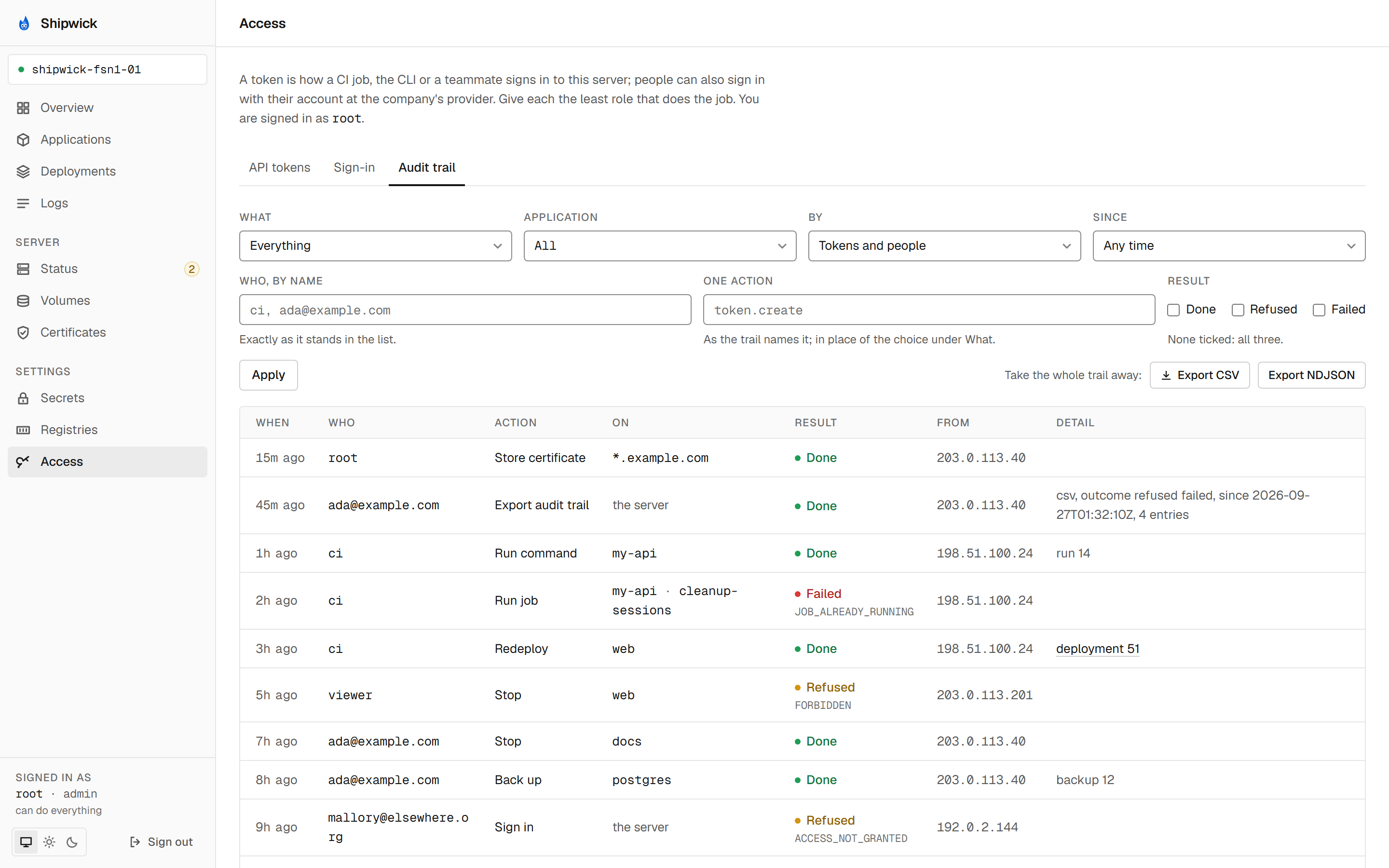
Under Access, the Audit trail tab shows the same, with Load older while older entries match. An entry that started a deployment links to it. The filters are above the table: the kind of action, the application, tokens or people, the time, a name, one action as the trail names it, and the result — done, refused or failed. Export CSV and Export NDJSON download everything that matches the filters.
From a script
curl -H "Authorization: Bearer $SHIPWICK_AGENT_TOKEN" \
  "https://agent.example.com/api/v1/audit?application=my-api&since=7d&limit=100"
GET /audit takes application, actor, actor_kind, action, outcome, since, limit and before, all optional, and needs admin. Since 0.7 the answer says whether older entries match as well, as more. GET /audit/export?format=csv streams everything that matches. See the API reference.
What's next
- Create tokens for CI and teammates: a name per pipeline and per person is what makes the trail readable.
- Sign in with your company's accounts: then the trail names people.
shipwick auditin the CLI reference.- Security.